前言
在团队开发中,有时需要共享常用代码片段,例如通用列表页、通用详情页等。我想是否可以通过 VS Code 扩展来帮助团队高效地管理并使用这些片段。
本文将讨论如何开发一个 VS Code 扩展,将代码片段保存在 GitLab 仓库中,并在扩展中提供 Webview 显示、下载到项目中以及编辑管理的功能。
效果图
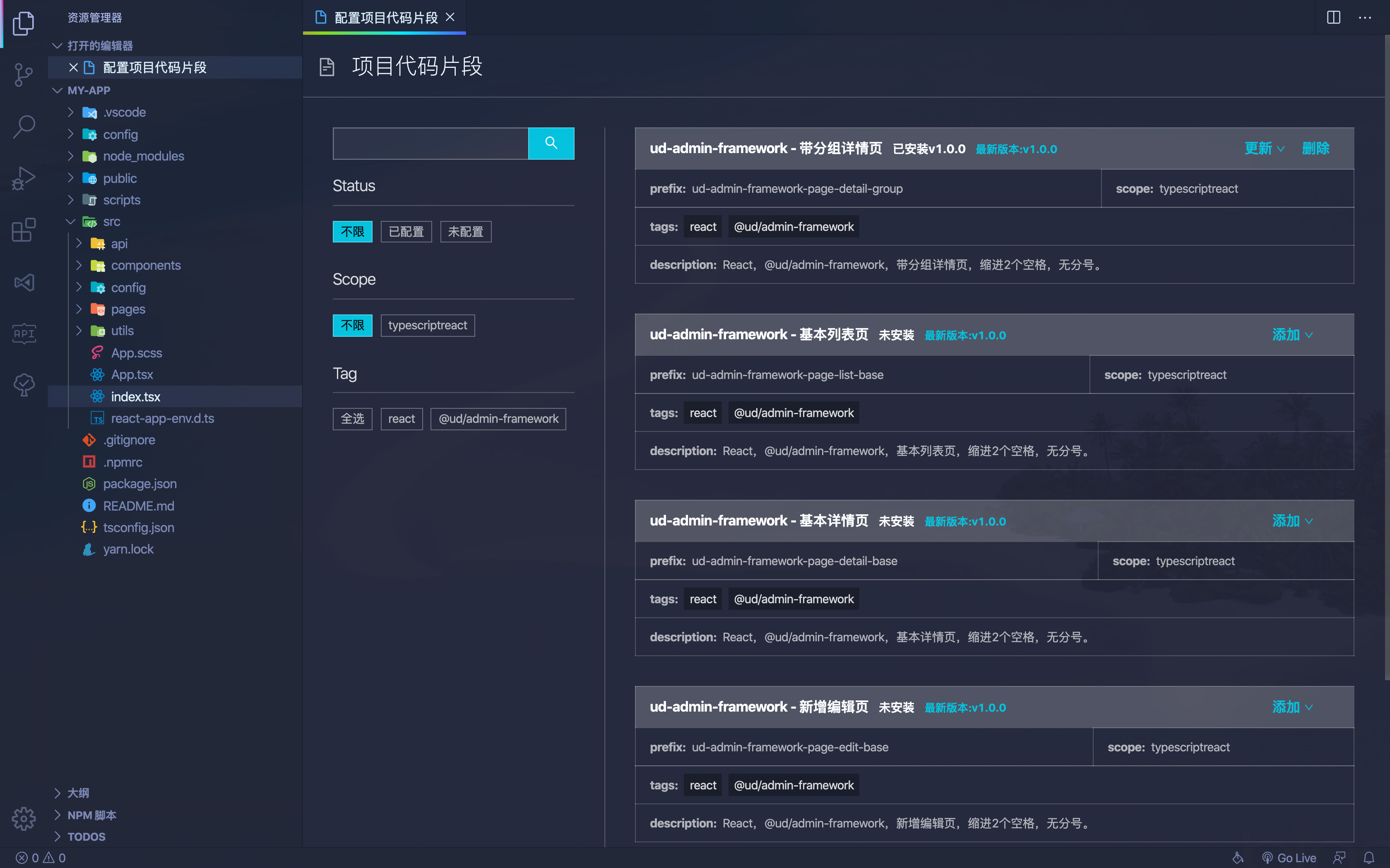
思路分析
- 将代码片段存储在 GitLab 仓库,方便维护和管理。
- 通过 Webview 显示代码片段列表,便于选择并提供操作。
- 在 Webview 中提供增删和更新代码片段功能。
GitLab 仓库中管理代码片段
为了让代码片段管理更加规范化,我们需要设计一个合理的 GitLab 仓库结构。
考虑到有以下需求:
- 代码片段支持多个版本。
- 代码片段需要包含元数据(作者、更新时间、标签、描述等)。
- 需要提供 API 供 VS Code 扩展使用,以便获取所有代码片段。
目录结构设计如下:
1
2
3
4
5
6
7
8
9
10
11
12
| scripts
├── build.js # 用于构建代码片段,生成 JSON 文件
src
├── code-snippet-1
│ ├── 1.0.0.tsx # 片段的代码内容
│ ├── index.json # 代码片段的元数据
│ ├── 1.0.0.json # 构建后的代码片段
├── code-snippet-2
│ ├── 1.0.0.tsx
│ ├── index.json
│ ├── 1.0.0.json
index.json # 所有代码片段列表,由 build.js 生成
|
片段的代码内容示例
1
2
3
4
5
6
7
8
9
10
11
12
13
14
15
16
17
18
19
20
21
22
23
| import React, { Component } from "react";
class $TM_FILENAME_BASE$ extends Component<
I$TM_FILENAME_BASE$Props,
I$TM_FILENAME_BASE$State
> {
constructor(props: I$TM_FILENAME_BASE$Props) {
super(props);
this.state = {};
}
componentDidMount() {}
render() {
return <div></div>;
}
}
interface I$TM_FILENAME_BASE$Props {}
interface I$TM_FILENAME_BASE$State {}
export default $TM_FILENAME_BASE$;
|
代码片段元数据信息:
1
2
3
4
5
6
7
8
| {
"name": "ud-react-class-component",
"scope": "typescriptreact",
"prefix": "ud-react-class-component",
"tags": ["react"],
"description": "React,class component,缩进2个空格,无分号。",
"author": "yaoworld"
}
|
扩展中 Webview 显示页面内容
这部分技术基本看官方文档就行,但还是有 2 个点需要注意。
Webview 加载远程内容
- VS Code Webview 不支持直接设置 src,只能设置 HTML。可以通过以下方法动态加载内容:
1
2
3
4
5
6
7
8
9
10
| this.webviewPanel.webview.html = await this.getWebViewContent(path);
async getWebViewContent(path: string) {
let url = 'http://127.0.0.1:1234'
let html = await rp(url)
html = html.replace(/(<link.*?href="|<script.(!>)*?src="|<img.*?src=")(.+?)"/g, (m: string, $1: string, $2: string, $3: string) => {
return $1 + (url + $3) + '"'
})
return html.replace('$currentPath', path)
}
|
Webview 不支持常规路由
经过测试目前是不支持的前端常规路由(不包含内存路由)的,除此之外还有不少功能都是有限制的。
要么通过多入口的方式解决。
要么使用类似内存路由的方式解决,如果加载时需要加载其他路径,可以参考下面方式解决。
1
2
3
4
5
| <script>
window.my = {
currentPath: "$currentPath",
};
</script>
|
1
2
|
html.replace("$currentPath", path);
|
读取和写入本地代码片段
原理就是在当前项目的 .vscode 目录下 创建一个 xx.code-snippets 文件,内容格式是 JSON,里面存储着当前项目的所有代码片段。
读取代码片段,可以参考:
1
2
3
4
5
6
7
8
9
10
11
12
13
14
15
16
17
| private read = () => {
if (vscode.workspace.rootPath == null) {
throw new Error('请先打开一个工作区,再运行此命令')
}
const filePath = path.join(vscode.workspace.rootPath, '.vscode', 'my.code-snippets')
if (!fs.existsSync(filePath)) {
const dir = path.join(vscode.workspace.rootPath, '.vscode')
if (!fs.existsSync(dir)) {
fs.mkdirSync(dir, { recursive: true })
}
fs.writeFileSync(filePath, '{}')
return {}
}
const json = fs.readFileSync(filePath).toString()
const snippets = JSON.parse(json)
return snippets
}
|
写入代码与读取类似,只需使用 fs.writeFileSync 方法更新 my.code-snippets 文件。
如何将普通代码转换为代码片段
因为代码片段中存在一些变量,如 ${TM_FILENAME_BASE},但这个语法在我们的 tsx 是不合法的。所以我们需要做一下转换,比如使用 $TM_FILENAME_BASE$ 来表达。
先通过代码进行变量写法转换后,再通过下面的 toSnippet 方法对代码内容进行转换。
1
2
3
4
5
6
7
8
9
10
11
12
13
| function toSnippet(code) {
const separatedSnippet = code
.replace(/\\/g, "\\\\")
.replace(/"/g, '\\"')
.split("\n");
const separatedSnippetLength = separatedSnippet.length;
let snippet = separatedSnippet.map((line, index) => {
return index === separatedSnippetLength - 1 ? `"${line}"` : `"${line}",`;
});
snippet = snippet.join("\n");
return snippet;
}
|
转换后,再包装成如下格式就行了:
1
2
3
4
5
6
| {
"body": [
"import React from 'react';",
"export default () => <div>Hello World</div>;"
]
}
|
结语
本文只介绍了些思路,具体的一些实现细节,需要自己看文档摸索下。