最近在开发 IM 产品时,需要改造聊天输入框并参考飞书的交互效果。初看到这个自动换行变高的效果,第一反应是需要通过 JavaScript 动态计算来实现。然而使用 AI 辅助开发后,效果并不理想。于是我查看了飞书网页版的源码,意外发现这个看似复杂的效果竟然是通过纯 CSS 的 Flex 布局实现的。
通过巧妙运用 flex-wrap、flex-auto 和 margin-left: auto 这三个关键属性,不仅代码更加简洁优雅,性能表现也远超 JavaScript 方案。
效果动图
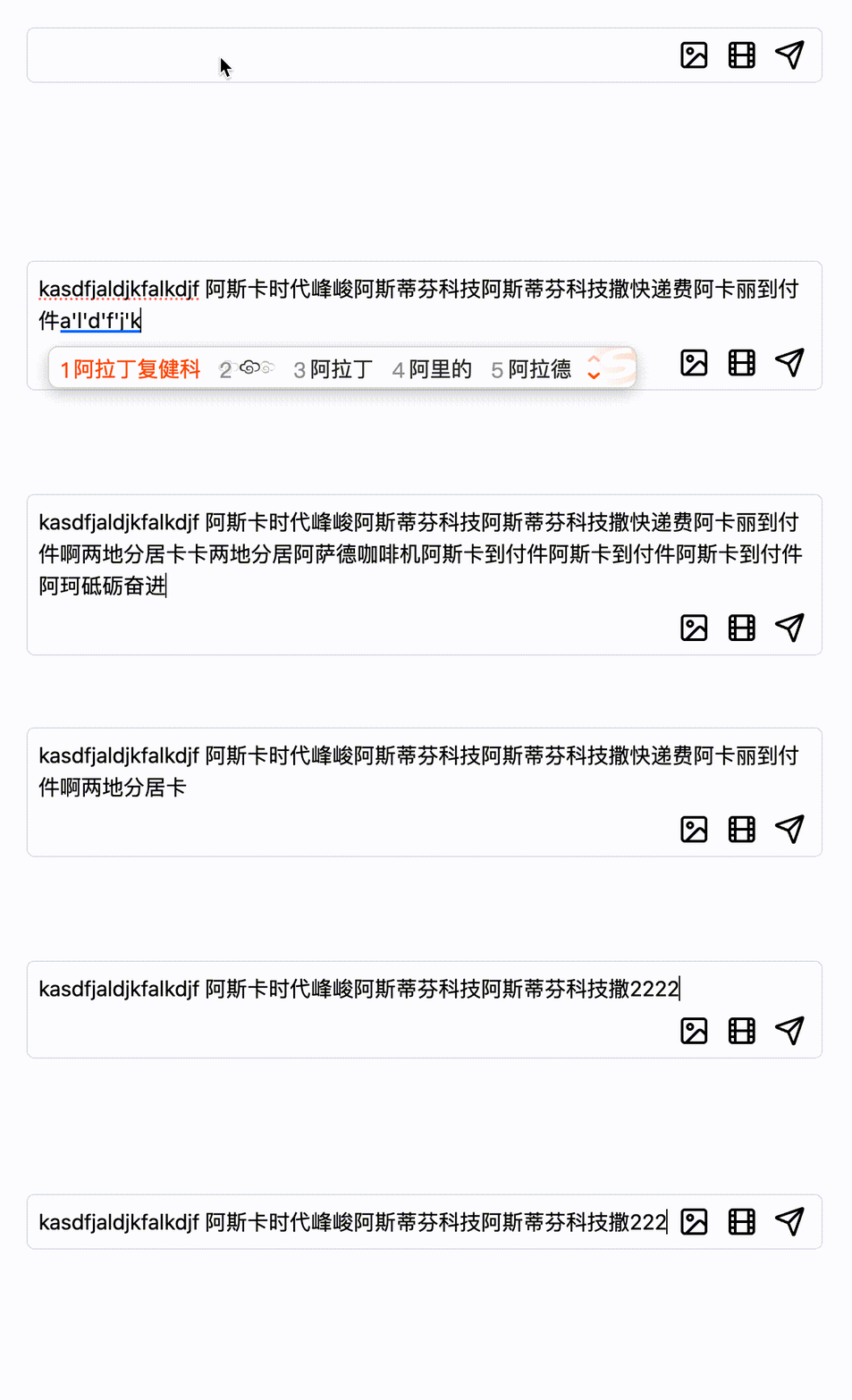
效果说明
当输入框内容较少时,输入框和按钮组在同一行显示:
1
| [输入框........................] [按钮组]
|
当输入框内容增多需要换行时,由于 flex-wrap 的作用,按钮组会自动换到下一行,并通过 margin-left: auto 保持右对齐:
1
2
3
| [输入框内容第一行.....................]
[输入框内容第二行.....................]
[按钮组]
|
效果体验
核心原理
这个效果的核心在于巧妙地运用了 Flex 布局的三个关键属性:
flex-wrap: 允许 flex 项目换行flex-auto: 让输入框自动占据可用空间margin-left: auto: 将按钮组推到右侧
完整代码实现
1
2
3
4
5
6
7
8
9
10
11
12
13
14
15
16
17
18
19
20
21
22
23
24
25
26
27
28
29
30
31
32
33
34
35
36
37
38
39
40
41
42
43
44
45
46
47
48
49
50
51
52
53
54
55
56
57
58
59
60
61
62
63
64
65
66
67
68
69
70
71
72
73
74
75
76
77
78
79
80
81
| <!DOCTYPE html>
<html lang="en">
<head>
<meta charset="UTF-8" />
<meta name="viewport" content="width=device-width, initial-scale=1.0" />
<meta http-equiv="X-UA-Compatible" content="ie=edge" />
<title>Flex 自动变高输入框</title>
<script src="https://cdn.tailwindcss.com"></script>
</head>
<body class="p-10">
<div class="flex flex-row flex-wrap border rounded-md w-[600px] pb-2">
<div
contenteditable
class="relative overflow-y-scroll flex-auto max-h-[100px] has-[div+div]:w-full m-2 mb-0 outline-none"
placeholder="请输入消息..."
></div>
<div class="flex flex-nowrap items-center ml-auto mr-3 mt-2 gap-3">
<button title="插入图片">
<svg
xmlns="http://www.w3.org/2000/svg"
width="24"
height="24"
viewBox="0 0 24 24"
fill="none"
stroke="currentColor"
stroke-width="2"
stroke-linecap="round"
stroke-linejoin="round"
>
<rect width="18" height="18" x="3" y="3" rx="2" ry="2" />
<circle cx="9" cy="9" r="2" />
<path d="m21 15-3.086-3.086a2 2 0 0 0-2.828 0L6 21" />
</svg>
</button>
<button title="插入视频">
<svg
xmlns="http://www.w3.org/2000/svg"
width="24"
height="24"
viewBox="0 0 24 24"
fill="none"
stroke="currentColor"
stroke-width="2"
stroke-linecap="round"
stroke-linejoin="round"
>
<rect width="18" height="18" x="3" y="3" rx="2" />
<path d="M7 3v18" />
<path d="M3 7.5h4" />
<path d="M3 12h18" />
<path d="M3 16.5h4" />
<path d="M17 3v18" />
<path d="M17 7.5h4" />
<path d="M17 16.5h4" />
</svg>
</button>
<button title="发送消息">
<svg
xmlns="http://www.w3.org/2000/svg"
width="24"
height="24"
viewBox="0 0 24 24"
fill="none"
stroke="currentColor"
stroke-width="2"
stroke-linecap="round"
stroke-linejoin="round"
>
<path
d="M14.536 21.686a.5.5 0 0 0 .937-.024l6.5-19a.496.496 0 0 0-.635-.635l-19 6.5a.5.5 0 0 0-.024.937l7.93 3.18a2 2 0 0 1 1.112 1.11z"
/>
<path d="m21.854 2.147-10.94 10.939" />
</svg>
</button>
</div>
</div>
</body>
</html>
|