前言

最近业余时间写 React 项目比较多,并且都用的 create-react-app 创建项目,每次创建完后,总要增删改一些配置和文件,显得有点麻烦。

回想起前几年在公司也做过类似的脚手架工具,所以今天打算自己写一个简单的,方便日常使用。

创建 cli

如果为了省事,可以直接通过 oclif 这个项目来创建 cli 项目,非常好用。

1
npx oclif generate mynewcli

如果想自己实现的话,原理大体如下:

首先在 package.json 中的 bin 字段中增加配置。如:

1
2
3
4
5
6
{
"name": "@my-space/react-dev-kit",
"bin": {
"react-dev-kit": "./lib/index.js"
}
}

然后在 ./lib/index.js 文件的第一行写上 #!/usr/bin/env node

我的 ./lib/index.js 文件是 src/index.ts 文件生成的。

剩下的主要就是接受命令行参数,可以自己解析参数,但一般使用三方库,如: commander

1
2
3
4
5
6
7
8
9
10
11
12
13
14
15
16
17
18
19
// src/index.ts
#!/usr/bin/env node
import { Command } from "commander";
import { createAction } from "./actions/create";
import { startAction } from "./actions/start";
import { buildAction } from "./actions/build";

const program = new Command();

program
.name("@my-space/react-dev-kit")
.description("The React Development Toolkit for MySpace")
.version("1.0.0");

program.command("create").description("").action(createAction);
program.command("start").description("").action(startAction);
program.command("build").description("").action(buildAction);

program.parse();

create command

create 命令相对简单,主要是提供一些模版供用户选择,并通过网络下载到本地。不过也还有一些细节是可以做的。

  • 模版列表和内容可以存储在类似 GitHubGitLab 的远程仓库中,并通过网络请求获取,这样维护起来更加方便。
  • 模版内容提供一个类似 define.js 的文件,先拉取到此文件,再根据配置让用户填写更多信息,配置完后需要执行的代码命令。
  • 下载模版文件时,可下载 zip 文件,再通过 7-zip 进行解压。

build command

考虑到可扩展性,除了引入外部配置,还支持了部分远程配置,同时为了后面使用方便还需要把常用的路径给事先获取到。

路径

这部分可以根据实际情况进行调整。我这里基本上是按照约定,固定了大部分路径。

1
2
3
4
5
6
7
8
9
10
11
12
13
14
15
16
17
18
19
20
21
22
23
24
25
// src/core/paths.ts
import fs from "fs";
import path from "path";
import { IExternalConfig, IPaths } from "../types";

export const appDirectory = fs.realpathSync(process.cwd());

export const resolveApp = (relativePath: string) =>
path.resolve(appDirectory, relativePath);

export const moduleFileExtensions = [".ts", ".tsx", ".js", ".jsx"];

export const getPaths = (config: IExternalConfig): IPaths => {
const path: IPaths = {
appPath: resolveApp("."),
appBuild: resolveApp(config.outputDir),
appPublic: resolveApp("public"),
appHtml: resolveApp("public/index.html"),
appSrc: resolveApp("src"),
appIndexJs: resolveApp("src/index.tsx"),
appTsConfig: resolveApp("tsconfig.json"),
// ...
};
return path;
};

外部配置

通过 IO 读取约定的配置文件,比如项目根目录下的 react-dev-kit.config.jsonreact-dev-kit.config.js 文件,这部分没任何难度。

远程配置

把部分配置设计为远程配置,比如 externals 配置,这样在有些项目部希望打包一些三方库( reactreact-domreact-router-dom 等)时就非常方便了。

远程服务器上可以存储一个类似下面的 JSON 配置文件。

1
2
3
4
5
6
7
8
9
10
11
12
13
14
15
16
17
18
19
20
// remote-externals.json
[
{
"moduleName": "react",
"globalName": "React",
"version": "xx.xx.x",
"js": [
"https://cdn.jsdelivr.net/npm/react@xx.xx.x/umd/react.production.min.js"
]
},
{
"moduleName": "react-dom",
"globalName": "ReactDOM",
"version": "xx.xx.x",
"js": [
"https://cdn.jsdelivr.net/npm/react-dom@xx.xx.x/umd/react-dom.production.min.js"
]
}
// ...
]

通过 httpAxios 等之类的库获取到上面的 json 内容,然后配置到 Webpackexternals 中。

1
2
3
4
const webpackConfig: Webpack.Configuration = {
//...
externals: getWebpackExternals(),
};

只配置 externals 还不够的,还需要在 index.html 引入对应的 jscss 文件,我们可以通过 Webpackplugin 来实现。

可参考如下:

1
2
3
4
5
6
7
8
9
10
11
12
13
14
15
16
17
18
19
20
21
22
23
24
25
26
27
28
29
30
31
32
33
34
35
// src/plugins/app-html-plugin.ts
import { Compiler } from "webpack";
import HtmlWebpackPlugin from "html-webpack-plugin";
import { IRemoteConfig } from "../types";

export class AppHtmlPlugin {
private remoteConfig: IRemoteConfig;

constructor(remoteConfig: IRemoteConfig) {
this.remoteConfig = remoteConfig;
}

apply(compiler: Compiler) {
compiler.hooks.compilation.tap("AppHtmlPlugin", (compilation) => {
HtmlWebpackPlugin.getHooks(compilation).beforeAssetTagGeneration.tapAsync(
"AppHtmlPlugin",
(data, cb) => {
const js: string[] = [];
const css: string[] = [];
this.remoteConfig.configContent.externals.forEach((item) => {
if (Array.isArray(item.js) && item.js.length > 0) {
item.js.forEach((n) => js.push(n));
}
if (Array.isArray(item.css) && item.css.length > 0) {
item.css.forEach((n) => css.push(n));
}
});
data.assets.js = [...js, ...data.assets.js];
data.assets.css = [...css, ...data.assets.css];
cb(null, data);
}
);
});
}
}

上下文

为了方便后续代码的使用,我们可以设计一个 Context 对象,在一开始把需要的数据配置都放在里面。

1
2
3
4
5
6
7
8
9
10
11
12
13
14
15
16
17
18
19
20
// src/core/context.ts
import { Env, IContext, Mode } from "../types";
import { getRemoteConfig } from "./remote-config";
import { getExternalConfig } from "./external-config";
import { getPaths } from "./paths";

export const createContext = async (mode: Mode): Promise<IContext> => {
const env: Env = {
NODE_ENV: mode,
BABEL_ENV: mode,
};
for (const key in env) {
process.env[key] = env[key];
}
const remoteConfig = await getRemoteConfig();
const externalConfig = getExternalConfig(env);
const paths = getPaths(externalConfig);

return { mode, env, paths, externalConfig, remoteConfig };
};

整合配置

这部分相对灵活,可以根据需求进行配置。最终,通过 webpack-merge 合并 内置配置远程配置外部配置,生成最终的 Webpack 配置。

1
2
3
4
5
6
7
8
9
10
11
12
13
14
15
16
17
18
19
20
21
22
23
24
25
26
27
28
29
30
31
32
33
34
35
36
37
38
39
40
41
42
43
44
45
46
47
48
49
50
51
52
53
// src/core/webpack-config.ts
import Webpack, { DefinePlugin, ProgressPlugin } from "webpack";
import merge from "webpack-merge";
import { IContext } from "../types";
import { moduleFileExtensions } from "./paths";
import { AppHtmlPlugin } from "../plugins/app-html-plugin";

export const getWebpackConfig = ({
mode,
env,
paths,
externalConfig,
remoteConfig,
}: IContext) => {
const isEnvDevelopment = mode === "development";
const isEnvProduction = mode === "production";

const webpackConfig: Webpack.Configuration = {
mode: isEnvDevelopment ? "development" : "production",
entry: [paths.appIndexJs],
output: {
publicPath: externalConfig.publicPath,
path: paths.appBuild,
// ...
},
devtool: isEnvProduction ? "source-map" : "cheap-module-source-map",
stats: "errors-warnings",
resolve: {
extensions: moduleFileExtensions,
},
optimization: {
// ...
},
module: {
rules: [
// ...
],
},
plugins: [
// ...
new AppHtmlPlugin(remoteConfig),
new DefinePlugin({
"process.env": Object.keys(env).reduce((obj, key) => {
obj[key] = JSON.stringify(env[key]);
return obj;
}),
}),
// ...
],
externals: remoteConfig.getWebpackExternals(),
};
return merge(webpackConfig, externalConfig.configureWebpack);
};

编译

获取最终配置后,直接使用 Webpack.Compiler 进行编译即可。

1
2
3
4
5
6
7
8
9
10
11
12
13
14
15
16
17
18
19
20
21
22
23
24
25
26
27
28
29
// src/actions/build.ts
import fs from "fs-extra";
import Webpack from "webpack";
import { createContext } from "../core/context";
import { getWebpackConfig } from "../core/webpack-config";

export const buildAction = async () => {
const context = await createContext("production");

const config = getWebpackConfig(context);
const compiler = Webpack(config);

fs.emptyDirSync(context.paths.appBuild);
fs.copySync(context.paths.appPublic, context.paths.appBuild, {
dereference: true,
filter: (file) => file !== context.paths.appHtml,
});
compiler.run((err, stats) => {
console.log("-".repeat(100));
if (stats) {
console.log(stats.toString());
console.log("-".repeat(100));
}
if (!err) {
console.log("build success");
console.log("-".repeat(100));
}
});
};

本文主要提供思路,并未详细列出各类 loader 和具体配置,建议读者自行查阅最新的相关文档。

start command

start 命令和 build 基本是差不多的,主要就是增加 dev-server 相关配置,可参考如下:

1
2
3
4
5
6
7
8
9
10
11
12
// src/actions/start.ts
export const startAction = async () => {
const context = await createContext("development");

const config = getWebpackConfig(context);
const compiler = Webpack(config);

const devServerConfig = getWebpackConfigDevServer(context);
const server = new WebpackDevServer(devServerConfig, compiler);

server.start();
};
1
2
3
4
5
6
7
8
9
10
11
12
13
14
15
16
// src/core/dev-server-config.ts
import webpackDevServer from "webpack-dev-server";
import { merge } from "webpack-merge";
import { IContext } from "../types";

export const getWebpackConfigDevServer = (context: IContext) => {
const defaultConfig: webpackDevServer.Configuration = {
port: "auto",
hot: true,
open: true,
client: {
progress: true,
},
};
return merge(defaultConfig, context.externalConfig.devServer);
};

前言

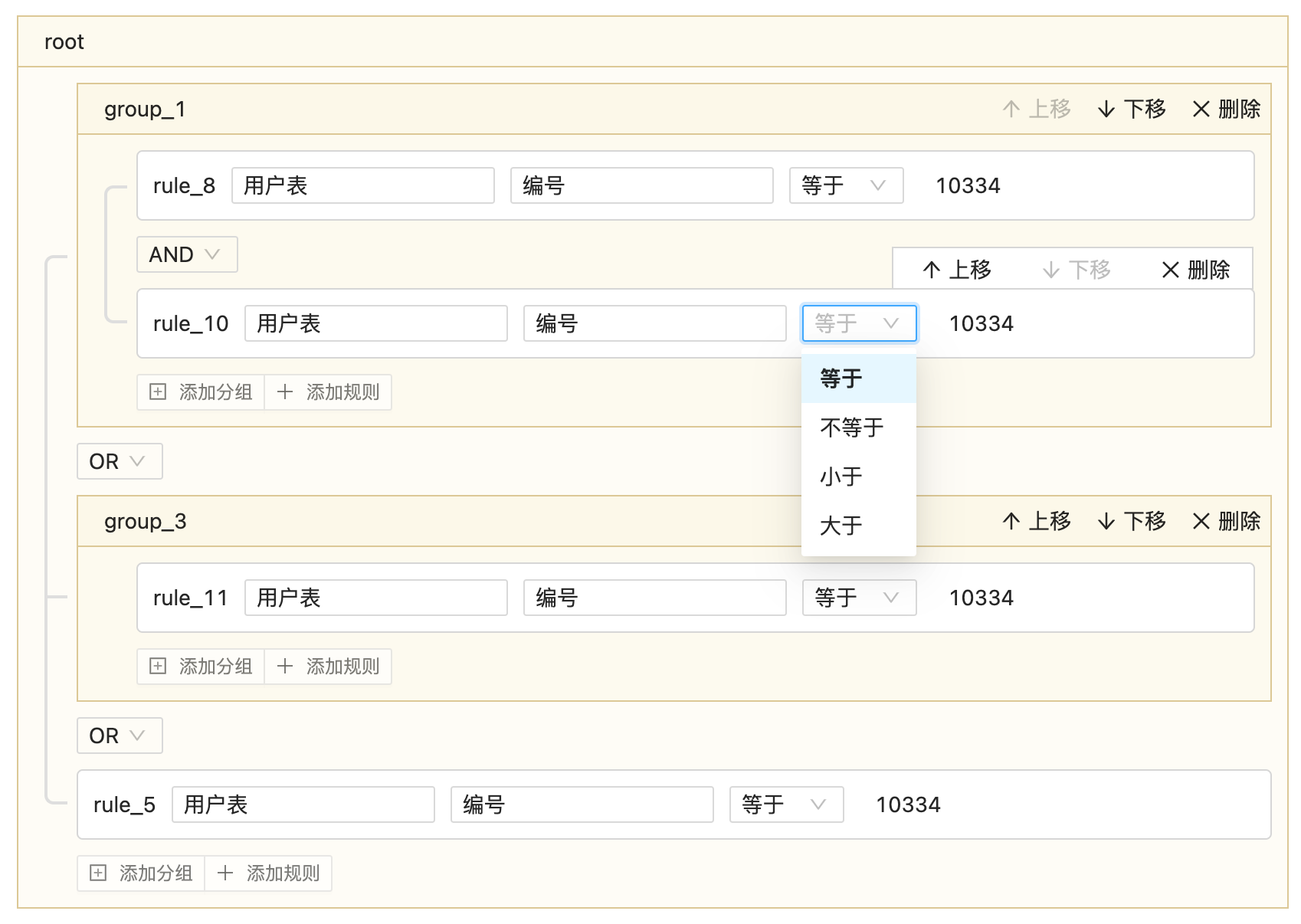
最近和朋友讨论技术的时候,提到这个 Query Builder,于是写了个简单的 Demo。

什么是 Query Builder?

  • 用于构建复杂查询条件,如 SQL 查询、查询条件,API 过滤等
  • 主要用于管理搜索条件、数据筛选、报告生成等

目标功能

  • 用户可以添加/删除查询条件
  • 支持 AND / OR 逻辑组合
  • 支持分组
  • 支持各类操作符

技术选择

React + TypeScript + Ant Design

类型定义

1
2
3
4
5
6
7
8
9
10
11
12
13
14
15
16
17
18
19
20
21
22
23
24
25
26
27
28
29
30
export interface QueryBuilderGroup {
id: string;
type: "group";
name?: string;
childrens: QueryBuilderItem[];
}

export interface QueryBuilderRule {
id: string;
type: "rule";
dataset: string;
datafield: string;
operator: QueryBuilderOperator;
value: any;
}

export interface QueryBuilderConnector {
id: string;
type: "connector";
value: QueryBuilderConnectorValue;
}

export type QueryBuilderConnectorValue = "OR" | "AND";

export type QueryBuilderItem =
| QueryBuilderGroup
| QueryBuilderRule
| QueryBuilderConnector;

export type QueryBuilderOperator = "=" | "<>" | "<" | ">";

具体实现

因为是快速做的 Demo,所以一把梭,并没有分太多组件出来。

1
2
3
4
5
6
7
8
9
10
11
12
13
14
15
16
17
18
19
20
21
22
23
24
25
26
27
28
29
30
31
32
33
34
35
36
37
38
39
40
41
42
43
44
45
46
47
48
49
50
51
52
53
54
55
56
57
58
59
60
61
62
63
64
65
66
67
68
69
70
71
72
73
74
75
76
77
78
79
80
81
82
83
84
85
86
87
88
89
90
91
92
93
94
95
96
97
98
99
100
101
102
103
104
105
106
107
108
109
110
111
112
113
114
115
116
117
118
119
120
121
122
123
124
125
126
127
128
129
130
131
132
133
134
135
136
137
138
139
140
141
142
143
144
145
146
147
148
149
150
151
152
153
154
155
156
157
158
159
160
161
162
163
164
165
166
167
168
169
170
171
172
173
174
175
176
177
178
179
180
181
182
183
184
185
186
187
188
189
190
191
192
193
194
195
196
197
198
199
200
201
202
203
204
205
206
207
208
209
210
211
212
213
214
215
216
217
218
219
220
221
222
223
224
225
226
227
228
229
230
231
232
233
234
235
236
237
238
239
240
241
242
243
244
245
246
247
248
249
250
251
252
253
254
255
256
257
258
259
260
261
262
263
264
265
266
267
268
269
270
271
272
273
274
275
276
277
278
279
280
281
282
283
284
285
286
287
288
289
290
291
292
293
294
295
296
297
298
299
300
301
302
303
304
305
306
307
308
309
310
311
312
313
314
315
316
import _ from "lodash";
import React, { FormEvent, useState } from "react";
import classNames from "classnames";
import { Select, Input, Button, Form } from "antd";
import { useForm } from "antd/lib/form/Form";
import {
ArrowUpOutlined,
ArrowDownOutlined,
CloseOutlined,
PlusSquareOutlined,
PlusOutlined,
} from "@ant-design/icons";
import {
QueryBuilderConnector,
QueryBuilderConnectorValue,
QueryBuilderGroup,
QueryBuilderItem,
QueryBuilderOperator,
QueryBuilderRule,
} from ".";
import "./style.less";

const Option = Select.Option;

const RuleOperator: React.FC<{
value: QueryBuilderOperator;
}> = (props) => {
let options = [
{ title: "等于", value: "=" },
{ title: "不等于", value: "<>" },
{ title: "小于", value: "<" },
{ title: "大于", value: ">" },
];
return (
<Select size="small" value={props.value}>
{options.map((n) => (
<Option value={n.value}>{n.title}</Option>
))}
</Select>
);
};

const QueryBuilder: React.FC = (props) => {
const [form] = useForm();
const [root, setRoot] = useState<QueryBuilderGroup>({
id: "root",
type: "group",
childrens: [],
});

const isConnector = (
node: QueryBuilderItem
): node is QueryBuilderConnector => {
return (node as any).type == "connector";
};

const isGroup = (node: QueryBuilderItem): node is QueryBuilderGroup => {
return (node as any).type == "group";
};

const isRule = (node: QueryBuilderItem): node is QueryBuilderRule => {
return (node as any).type == "rule";
};

const build = (
node: QueryBuilderItem,
parent: QueryBuilderGroup | null = null,
level: number = 0
) => {
if (isConnector(node)) {
return buildConnector(node, parent!);
}
if (isRule(node)) {
return buildRule(node, parent!);
}
if (isGroup(node)) {
return buildGroup(node, parent, level);
}
};

const buildRoot = (node: QueryBuilderGroup, level: number) => {};

const buildConnector = (
node: QueryBuilderConnector,
parent: QueryBuilderGroup
) => {
const change = (value: QueryBuilderConnectorValue) => {
node.value = value;
setRoot({ ...root });
};

return (
<div className="connector">
<Select size="small" value={node.value} onChange={change}>
<Option value="OR">OR</Option>
<Option value="AND">AND</Option>
</Select>
</div>
);
};

const buildRule = (node: QueryBuilderRule, parent: QueryBuilderGroup) => {
let first = parent.childrens.findIndex((n) => n == node) == 0;
let last =
parent.childrens.findIndex((n) => n == node) ==
parent.childrens.length - 1;

return (
<div className={classNames("rule", { first: first, last: last })}>
<div className="rule-controls">
<div className="rule-id">{node.id}</div>
<div className="rule-dataset">
<Input size="small" value={node.dataset} />
</div>
<div className="rule-datafield">
<Input size="small" value={node.datafield} />
</div>
<div className="rule-operator">
<RuleOperator value={node.operator} />
</div>
<div className="rule-value">{node.value}</div>
</div>
{buildActions(node, parent)}
</div>
);
};

const buildActions = (
node: QueryBuilderRule | QueryBuilderGroup,
parent: QueryBuilderGroup
) => {
let len = parent.childrens.length;
let index = parent.childrens.findIndex((n) => n == node);

const moveUp = () => {
let prev = parent.childrens[index - 2];
parent.childrens[index - 2] = parent.childrens[index];
parent.childrens[index] = prev;
setRoot({ ...root });
};

const moveDown = () => {
let next = parent.childrens[index + 2];
parent.childrens[index + 2] = parent.childrens[index];
parent.childrens[index] = next;
setRoot({ ...root });
};

const remove = () => {
if (len > 1) {
if (index == len - 1) {
parent.childrens.length = len - 2;
} else {
parent.childrens.splice(index, 2);
}
} else {
parent.childrens = [];
}
setRoot({ ...root });
};

return (
<div className="action">
<div className="action-items">
<span
className={classNames("action-item", {
disable: len == 1 || index == 0,
})}
onClick={moveUp}
>
<ArrowUpOutlined />
<span>上移</span>
</span>
<span
className={classNames("action-item", {
disable: len == 1 || index == len - 1,
})}
onClick={moveDown}
>
<ArrowDownOutlined />
<span>下移</span>
</span>
<span className="action-item" onClick={remove}>
<CloseOutlined />
<span>删除</span>
</span>
</div>
</div>
);
};

const buildGroup = (
node: QueryBuilderGroup,
parent: QueryBuilderGroup | null,
level: number
) => {
let classes = classNames("group", `group-level-${level}`);
if (parent) {
let first = parent.childrens.findIndex((n) => n == node) == 0;
let last =
parent.childrens.findIndex((n) => n == node) ==
parent.childrens.length - 1;
classes = classNames(classes, { first: first, last: last });
}

return (
<div className={classes}>
<div className="group-header">
<div className="group-title">
<Form.Item
name={`group-${node.id}-name`}
noStyle
initialValue={node.id}
>
<Input size="small" />
</Form.Item>
</div>
{parent && buildActions(node, parent)}
</div>
<div className="group-body">
{node.childrens.map((n) => build(n, node, level++))}
</div>
<div className="group-footer">{buildAdder(node)}</div>
</div>
);
};

const buildAdder = (node: QueryBuilderGroup) => {
const addGroup = () => {
if (node.childrens.length > 0) {
node.childrens.push({
id: _.uniqueId("connector_"),
type: "connector",
value: "OR",
});
}
let id = _.uniqueId("group_");
node.childrens.push({
id: id,
type: "group",
name: id,
childrens: [],
});
setRoot({ ...root });
};
const addRule = () => {
if (node.childrens.length > 0) {
node.childrens.push({
id: _.uniqueId("connector_"),
type: "connector",
value: "OR",
});
}
node.childrens.push({
id: _.uniqueId("rule_"),
type: "rule",
dataset: "用户表",
datafield: "编号",
operator: "=",
value: "10334",
});
setRoot({ ...root });
};

return (
<div className="adder">
<Button.Group size="small">
<Button onClick={addGroup}>
<PlusSquareOutlined />
添加分组
</Button>
<Button onClick={addRule}>
<PlusOutlined />
添加规则
</Button>
</Button.Group>
</div>
);
};

const onValuesChange = (changedValues: any, values: any) => {
const find = (item: QueryBuilderItem, id: string): any => {
if (id == item.id) {
return item;
}
if (isGroup(item) && item.childrens && item.childrens.length > 0) {
for (const n of item.childrens) {
let result = find(n, id);
if (result) {
return result;
}
}
}
};
for (const key in changedValues) {
let [type, id, field] = key.split("-");
let node = find(root, id);
if (node) {
node[field] = changedValues[key];
}
}
console.log(root);
};

console.log(JSON.stringify(root));

return (
<div className="query-builder">
<Form form={form} onValuesChange={onValuesChange}>
{build(root)}
</Form>
</div>
);
};

export { QueryBuilder };

Demo 效果

因为是 Demo 的原因,数据集、字段名、字段值等并没有怎么做,只有一个实例。

前言

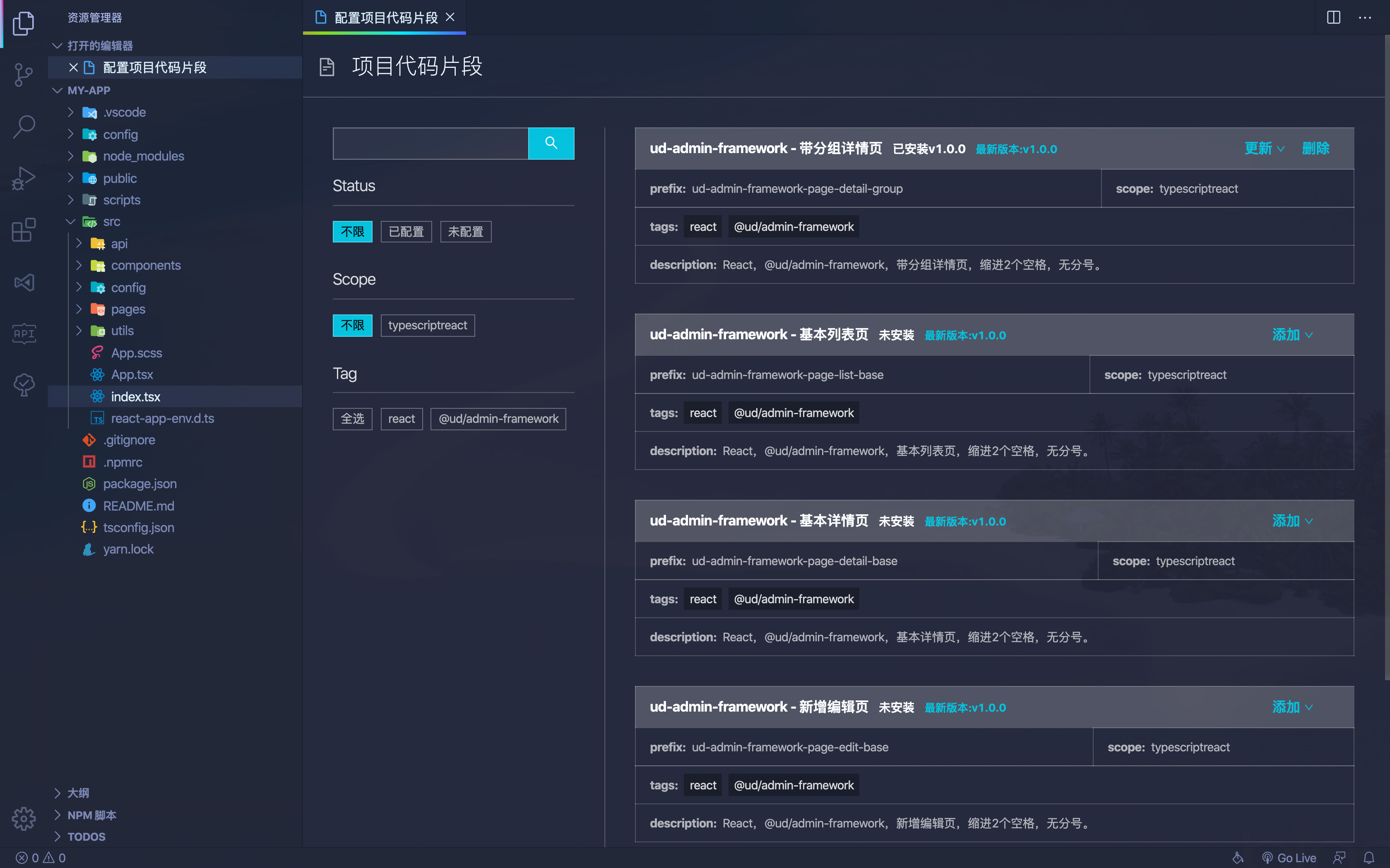
在团队开发中,有时需要共享常用代码片段,例如通用列表页、通用详情页等。我想是否可以通过 VS Code 扩展来帮助团队高效地管理并使用这些片段。

本文将讨论如何开发一个 VS Code 扩展,将代码片段保存在 GitLab 仓库中,并在扩展中提供 Webview 显示、下载到项目中以及编辑管理的功能。

效果图

思路分析

  • 将代码片段存储在 GitLab 仓库,方便维护和管理。
  • 通过 Webview 显示代码片段列表,便于选择并提供操作。
  • 在 Webview 中提供增删和更新代码片段功能。

GitLab 仓库中管理代码片段

为了让代码片段管理更加规范化,我们需要设计一个合理的 GitLab 仓库结构。

考虑到有以下需求:

  • 代码片段支持多个版本。
  • 代码片段需要包含元数据(作者、更新时间、标签、描述等)。
  • 需要提供 API 供 VS Code 扩展使用,以便获取所有代码片段。

目录结构设计如下:

1
2
3
4
5
6
7
8
9
10
11
12
scripts
├── build.js # 用于构建代码片段,生成 JSON 文件
src
├── code-snippet-1
│ ├── 1.0.0.tsx # 片段的代码内容
│ ├── index.json # 代码片段的元数据
│ ├── 1.0.0.json # 构建后的代码片段
├── code-snippet-2
│ ├── 1.0.0.tsx
│ ├── index.json
│ ├── 1.0.0.json
index.json # 所有代码片段列表,由 build.js 生成

片段的代码内容示例

1
2
3
4
5
6
7
8
9
10
11
12
13
14
15
16
17
18
19
20
21
22
23
import React, { Component } from "react";

class $TM_FILENAME_BASE$ extends Component<
I$TM_FILENAME_BASE$Props,
I$TM_FILENAME_BASE$State
> {
constructor(props: I$TM_FILENAME_BASE$Props) {
super(props);
this.state = {};
}

componentDidMount() {}

render() {
return <div></div>;
}
}

interface I$TM_FILENAME_BASE$Props {}

interface I$TM_FILENAME_BASE$State {}

export default $TM_FILENAME_BASE$;

代码片段元数据信息:

1
2
3
4
5
6
7
8
{
"name": "ud-react-class-component",
"scope": "typescriptreact",
"prefix": "ud-react-class-component",
"tags": ["react"],
"description": "React,class component,缩进2个空格,无分号。",
"author": "yaoworld"
}

扩展中 Webview 显示页面内容

这部分技术基本看官方文档就行,但还是有 2 个点需要注意。

Webview 加载远程内容

  • VS Code Webview 不支持直接设置 src,只能设置 HTML。可以通过以下方法动态加载内容:
1
2
3
4
5
6
7
8
9
10
this.webviewPanel.webview.html = await this.getWebViewContent(path);

async getWebViewContent(path: string) {
let url = 'http://127.0.0.1:1234'
let html = await rp(url)
html = html.replace(/(<link.*?href="|<script.(!>)*?src="|<img.*?src=")(.+?)"/g, (m: string, $1: string, $2: string, $3: string) => {
return $1 + (url + $3) + '"'
})
return html.replace('$currentPath', path)
}

Webview 不支持常规路由

经过测试目前是不支持的前端常规路由(不包含内存路由)的,除此之外还有不少功能都是有限制的。

要么通过多入口的方式解决。

要么使用类似内存路由的方式解决,如果加载时需要加载其他路径,可以参考下面方式解决。

1
2
3
4
5
<script>
window.my = {
currentPath: "$currentPath",
};
</script>
1
2
// vs code 再加载 html 内容给 webview 前进行替换
html.replace("$currentPath", path);

读取和写入本地代码片段

原理就是在当前项目的 .vscode 目录下 创建一个 xx.code-snippets 文件,内容格式是 JSON,里面存储着当前项目的所有代码片段。

读取代码片段,可以参考:

1
2
3
4
5
6
7
8
9
10
11
12
13
14
15
16
17
private read = () => {
if (vscode.workspace.rootPath == null) {
throw new Error('请先打开一个工作区,再运行此命令')
}
const filePath = path.join(vscode.workspace.rootPath, '.vscode', 'my.code-snippets')
if (!fs.existsSync(filePath)) {
const dir = path.join(vscode.workspace.rootPath, '.vscode')
if (!fs.existsSync(dir)) {
fs.mkdirSync(dir, { recursive: true })
}
fs.writeFileSync(filePath, '{}')
return {}
}
const json = fs.readFileSync(filePath).toString()
const snippets = JSON.parse(json)
return snippets
}

写入代码与读取类似,只需使用 fs.writeFileSync 方法更新 my.code-snippets 文件。

如何将普通代码转换为代码片段

因为代码片段中存在一些变量,如 ${TM_FILENAME_BASE},但这个语法在我们的 tsx 是不合法的。所以我们需要做一下转换,比如使用 $TM_FILENAME_BASE$ 来表达。

先通过代码进行变量写法转换后,再通过下面的 toSnippet 方法对代码内容进行转换。

1
2
3
4
5
6
7
8
9
10
11
12
13
function toSnippet(code) {
const separatedSnippet = code
.replace(/\\/g, "\\\\")
.replace(/"/g, '\\"')
.split("\n");
const separatedSnippetLength = separatedSnippet.length;

let snippet = separatedSnippet.map((line, index) => {
return index === separatedSnippetLength - 1 ? `"${line}"` : `"${line}",`;
});
snippet = snippet.join("\n");
return snippet;
}

转换后,再包装成如下格式就行了:

1
2
3
4
5
6
{
"body": [
"import React from 'react';",
"export default () => <div>Hello World</div>;"
]
}

结语

本文只介绍了些思路,具体的一些实现细节,需要自己看文档摸索下。

  • 第 1 页 共 1 页
作者的图片

YaoWorld

热爱编程,热爱生活。

前端工程师

中国-成都